
What The Heck Is An “SEO Browser”?
I assumed, from this description, I was about to find myself downloading and installing an actual browser – one especially made to browse the web like an SEO. Nope! Rather, think of Browseo more like a virtual browser. Or a “browser within a browser”. Its a web app really.
An SEO-Virtual-Browser-Within-A-Browser-Web-App. Ok, get it? I’ll show it to you!
Let’s look at the website of this coffee company… I’d recently come across this local coffee roaster, New Harvest Coffee Roasters – and I really like their stuff, so I thought we’d use their site as a trial run. (And nope this isn’t a plug for them, in fact I gave them some Twitter-love not too long ago and I don’t think they were listening. We’ll talk about that later.) Moving on…
A Quick Walkthrough of Browseo Is Very Promising
The Browseo Homepage
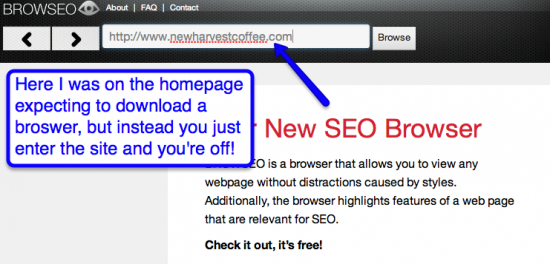
As I mentioned, you don’t have to do ANYTHING. You just enter the page you want to view from an SEO perspective and hit enter. Nothing to install or download.
The Basic Features
So I hit enter on our coffee website and we’re off!

First, you’re greeted with a nice clean layout – the pure HTML on the left and some useful header info on the right.

You can highlight three link-types; internal, external and no-followed. You can also click on any link and it will take you to that page within Browseo. Pretty cool!
There’s forward and back buttons too.
Next, we’ll have to switch to another website, so I can show you more stuff (The coffee site is a little light on content etc.)
My wife likes this company called Sumbody, and I remember their website being a good subject, so let’s check it out!
Displays Header Information
The easy to read UI gives you a quick look at useful header stuff. Sumbody.com’s header info for their homepage;
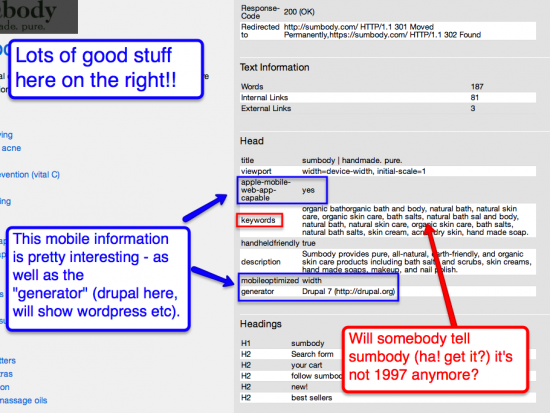
I like the simple easy to read UI – and especially like the info like “Generator” (instantly saw this was a Drupal site) and the mobile compatibility info.
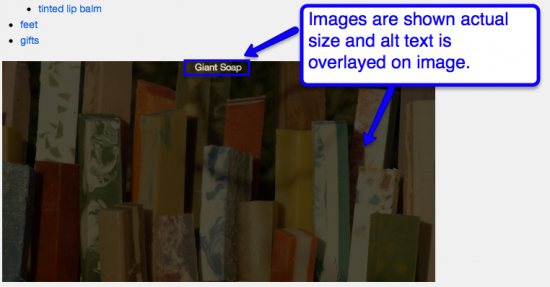
I like how the images are displayed within the HTML view as well. They are shown actual size (not being resized by CSS etc) and there’s a simple overlay of the alt attribute on the image. Easy!
Great, But What’s So Special / Unique About Browseo?
My very first thought was “isn’t this stuff we can do already?” – just the same as what Mike King tweeted about earlier – and I have to admit, that was my first reaction as well. But moving beyond that I think there’s a bunch of things that make Browseo a promising tool.
Your Non-Geeky Clients/Prospects Can Use It
Your clients don’t need Chrome with a certain plugin to get a quick look at their site in this “SEO View”. Just give em a link to browseo.net and tell them to enter their site. You don’t need to take screenshots and email them.
But one thing I also think this does, is it lowers the barrier to entry especially for non-techy or less geeky folks to have an alternative view at their website. The everyday blogger, or small local business owner, or heck even corporate people who simply don’t have the time or desire really to download all sorts of plugins. You just tell them; go to browseo, plug in your site name and even as a layman you can understand certain things that just won’t look right.
Review A Site On A Mobile Device
I was “auditing” the sumbody.com website on my iPhone while waiting in line at Friendly’s.
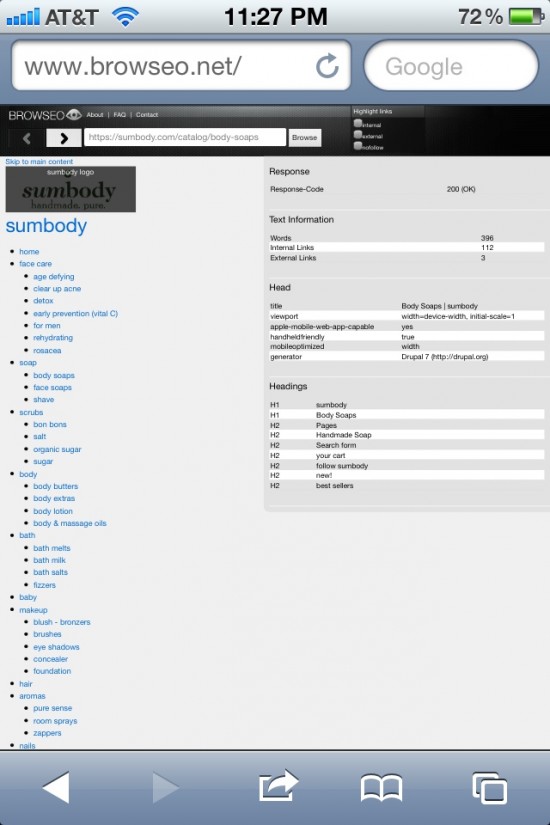
Now that’s a pretty geeky thing to do 🙁 …I just pretended I was doing something way “cooler” – like Angry Birds or texting my pals – didn’t want the high school kids nearby to think I was some kind of a loser, lol.
I’m sure there’s ways to view source on mobile devices (I haven’t really checked that out much) – but you can’t deny how easy this is.
SEOs – Use At Meetings, Conferences, Dinners (Weddings, Boring Parties…)
Uber-convenient right? At a conference, or a meeting, or even a dinner with colleagues, or an unfamiliar computer? Doesn’t matter anymore. The beauty of this basically being a web based app is you can use it anywhere. So don’t get caught not being able to shut of CSS or view source or otherwise analyze crucial technical aspects of a site when you’ve left your machine behind.
A Few Feature Suggestions
Jonathan from Browseo emailed me after I tweeted about it, and said they were really open to suggestion from the community and would consider feature requests etc. I thought of a few for ya!
URL To Share “SEO View” Of A Site
I would LOVE to just send a link off to a client like – http://www.browseo.net/seo-view/sumbody.com – and have it bring them right to that page within Browseo.
And think about it. You’d potentially get these as LINKS pointing back to your domain from people sharing a link like “hey check out this browseo view of xyz site”.
Tweet To Share SEO View
I think a natural expansion of having a sharable URL would be the ability to do this with share buttons – “tweet a browseo of this page” sort of thing. Could be Facebook shares – anything.
Provide A List Of All Header Information
This isn’t so much for right in the app, more for your documentation or resources pages – but if you could list all the header items you would potentially show that would be really useful. You only display what’s present in the site you’re viewing, so I’m not sure what may be missing.
Instant Screenshot Export
I’m not sure how difficult something like this is, but most of the pages are going to VERY long. In the situation you do need to send off something to a client quickly, or keep a screenshot for records this would be a very useful feature I think, especially if you don’t have a screenshot plugin handy.
One Marketing Suggestion – Technically NOT A “Browser”
I love the name “Browseo” but I would consider describing it as something other than a “browser” (I’m not suggesting changing the product name, just how you’re describing it).
Like I said at the top, I assumed I was going to be downloading an actual piece of software. I was actually EXCITED to find this was more like a web app. That’s so much easier!
Think of things along the lines of “browser within a browser” or a “virtual browser” and definitely calling it a “web app” (which is what it is) and you’d be far more likely (I think) to get people trying it.
This could be a HUGE advantage for you in terms of promoting the product so I would recommend using that kind of language, rather than just “browser”.
I’m Sure Browseo Would Love To Hear What You Think!!
Jonahthan mentioned to me they would have a place one their site soon for feedback. But why not give browseo a try and leave some feedback here as well? I’d be interested to see what others think of it.

April 22, 2012
Daniel
Nice review. Seems pretty handy, especially since we can do a quick audit on iPhone. I have a feature suggestion. It’s probably a long term one. But you could include a field for a target keyword and provide an overlay of information teaching the viewer which elements need to be optimized and what the best practice is. When keywords are added the page can be graded like SEOmoz.
April 22, 2012
Jonathan
Sounds good, Daniel. We’re looking into it!
April 22, 2012
Jonathan
Dan,
thanks so much for taking the time for a detailed review and for spreading the word! The last few days have been amazing for us, we got great feedback and suggestions, which is exactly what we need in order to improve.
Mobile devices: we’re actually working on a responsive design for the site so that browsing on your iphone will be even more convenient 🙂
URLs to share SEO view of a site: we thought about that. There are two reasons why we decided against it. First, the potential for automated tools scraping our site is a bit frightening. Also, we need to make sure that those pages would not get indexed. Otherwise it would be too easy to duplicate the content of any page and potentially have it indexed before the original – similar to “Proxy Hacking”. We know that poeple are doing it and we don’t want to make it easier for them 🙂
That said, blocking those pages would not be a problem so we’re reconsidering those “shareable” URLs. I’ll get back to you about that.
List of all header information: you’re right, people should know what’s missing. Since we want to make it “beginner-friendly” we need more info like that.
Screenshot export: I’m talking to our team about it. Meanwhile, we thought about CSV export at least for the additional data.
The web-app-browser-within-a-browser thing 🙂 – good point. I thought it was obvious but this clearly shows that we need to ask more people for feedback! Meanwhile I’ve added the term web app to the home page, hope that makes it more clear.
Cheers!
April 26, 2012
Jonathan
We’ve created a responsive design, so Browseo should be even more fun to use while waiting in line now. Enjoy!
May 3, 2012
Graeme Benge
Good post Dan, thanks for sharing. The tool will really come into it’s own with client discussions. Some people understand things better visually. This layout shouldn’t intimidate novices either.
Johnathan, congrats on a great tool – it’s been bookmarked!
May 16, 2012
SEPo
Thanks for the share Dan – Awesome tool – now in my toolbox ..
June 14, 2012
Jonathan
Browseo has shareable URLs now like you suggested, check out http://www.browseo.net/?url=https://www.evolvingseo.com
Just to be clear: we’re blocking all those results pages via robots.txt plus a robots meta tag, so we should be on the safe side regarding what I described earlier.
@Graeme & SEPo – thanks for your support!
Have fun sharing 😉
June 14, 2012
Dan Shure
That’s awesome Jonathan! Thank you!!
June 15, 2012
Jonathan
FYI, just released another update – now 2x faster and recognizes microformats (RDFa / schema.org). Examples:
http://www.browseo.net/?url=http://www.rottentomatoes.com/m/toy_story_3/
http://www.browseo.net/?url=http://examples.tobyinkster.co.uk/hcard
Enjoy!
June 19, 2012
Dan Shure
Thanks! Just checked out the inclusion of microformats and that’s VERY helpful. My ecommerce clients especially will love that 🙂
November 8, 2012
Jonathan
Hi everyone, a first release of the Android app is now available:
https://play.google.com/store/apps/details?id=com.ilscipio.browseo
Would love to hear your thoughts!
November 8, 2012
Dan Shure
Phenomenal! Thanks for the update. I’ve done a lot of tweeting lately, so I’ll be sure to share it when it’s likely to get noticed better 🙂
November 20, 2012
Jonathan
We just added the ability to download the data of an entire session in a spreadsheet. Enjoy.
April 12, 2013
Jonathan
Wow, it’s been almost one year. Time goes fast these days! 🙂 The Browseo iPhone app just got approved, and it’s free for all!
https://itunes.apple.com/app/browseo-your-new-seo-browser/id631363367?mt=8
April 14, 2013
Dan Shure
+1000!!
May 26, 2015
Petjoy
Great tool to spot crawling issues 🙂